Ofivio — from onboarding to final delivery · Part 4 · Design · Chapter 18 of 56
Sets and the Lock
Join the written lines into sets — one deliverable each — check every register, and lock the design so the budget and the timeline can follow.
Sets and the Lock
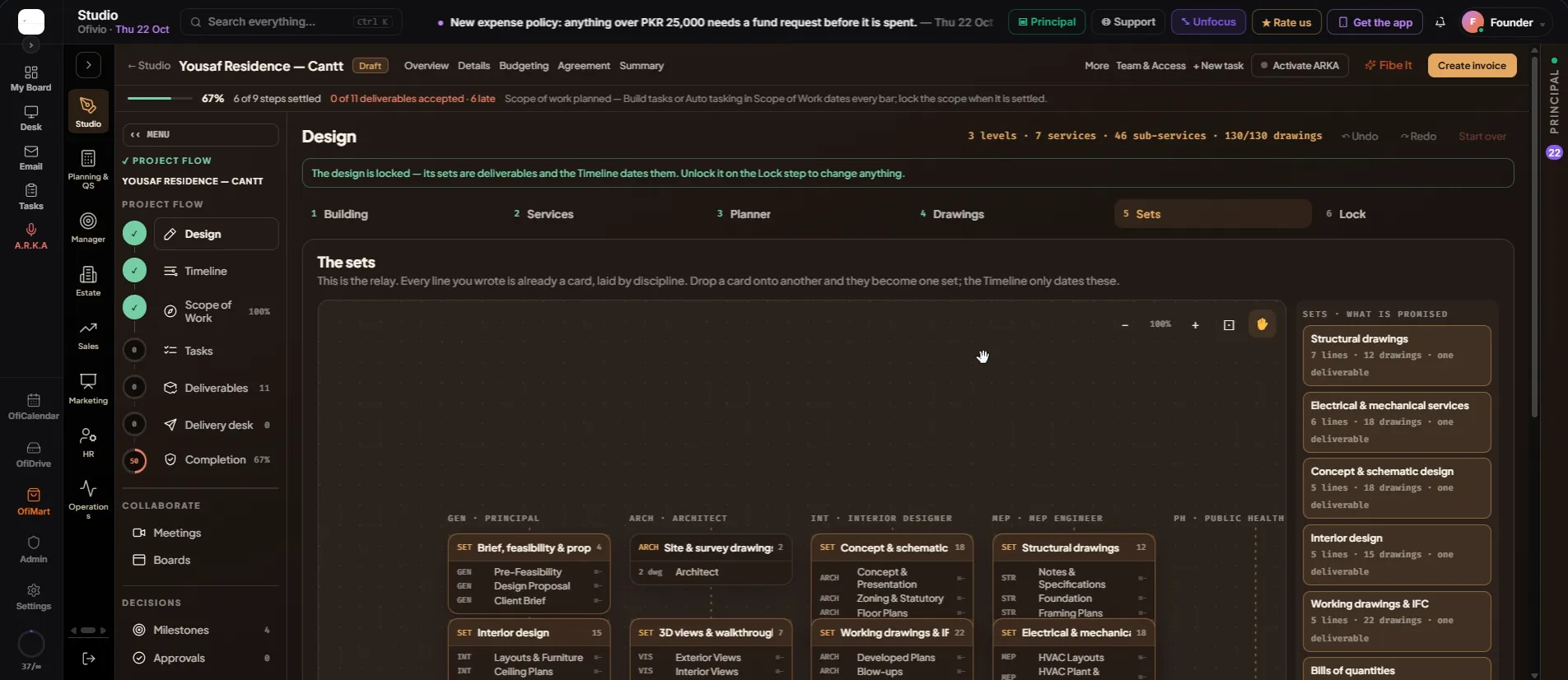
Steps 5 and 6 turn what you wrote into what you owe. On the Sets step every written line is a card; join cards into sets, and each set becomes one deliverable. The Lock step shows those deliverables with their registers, and one press locks the design: the sheets go into the drawing register, every set becomes a deliverable, and the Timeline receives the sets to date. After the lock, Budgeting is next.
- Read the canvas — Step 5: "The sets" — "This is the relay. Every line you wrote is already a card, laid by discipline." Each lane is headed by its service and consultant (GEN · PRINCIPAL, ARCH · ARCHITECT …); each card shows its drawings and who draws it.
- Join cards into a set — Drag a card onto another and they become one set. The card now reads "SET", lists its lines with their service codes, and adds up the drawings. Drop more cards on it to grow it.
- Name the set — Type a name over the set's title — "Concept & schematic design", "Working drawings & IFC". Left alone, a set is named from its lines.
- Take a line out — Press ⇤ beside a line and it becomes its own card again.
- Check what is promised — On the right, "Sets · what is promised" lists every set with its lines, its drawings and "one deliverable". Then press "Next: Lock →".
- Read the cards — Step 6: "Lock the design" — "One lock. Every card becomes one deliverable." Each card shows "set of one" or "set of …", its name, its lines (a bill reads by its service, such as "Architecture BOQ"), who draws it and its drawings.
- Open a register before you lock — Press "open the register ›" on a card to see every sheet of that set. Strike a drawing with ✕, or add one: choose the line under "Add a drawing to", type the title, pick the size and scale, and press "+ Add".
- Press "🔒 Lock the design" — Ofivio asks: "Lock the design? Every set becomes one deliverable, every written sheet lands in the register, and the Timeline dates the sets." Press "🔒 Lock the design", or "Not yet". It answers with what it wrote: the drawings written, the sets on the Timeline and the deliverables owed.
- Go on to Budgeting — A green line now reads "The design is locked — its sets are deliverables and the Timeline dates them." Each card says "locked · deliverable". Press "🔒 Locked — next: Budgeting →".
Building → Services → Planner → Drawings → Sets → Lock → Budgeting → Timeline