Ofivio — from onboarding to final delivery · Part 11 · Final delivery · Chapter 47 of 56
Completion and handover
Read the gates that stand between a project and closed, close it cleanly or with named exceptions, and hand a site over with the taking-over certificate.
Completion and handover
Completion is the last room of the project flow. It does not ask whether you feel finished; it reads the record. In the Studio it checks the deliverables, the approvals, the money and the tasks, and lets the principal close the project. On a Build & Site site it checks the works, the snags and the payment certificates, and lets the principal issue the taking-over certificate that starts the defects liability clock. Only the principal closes, reopens or hands over.
Closing a Studio project
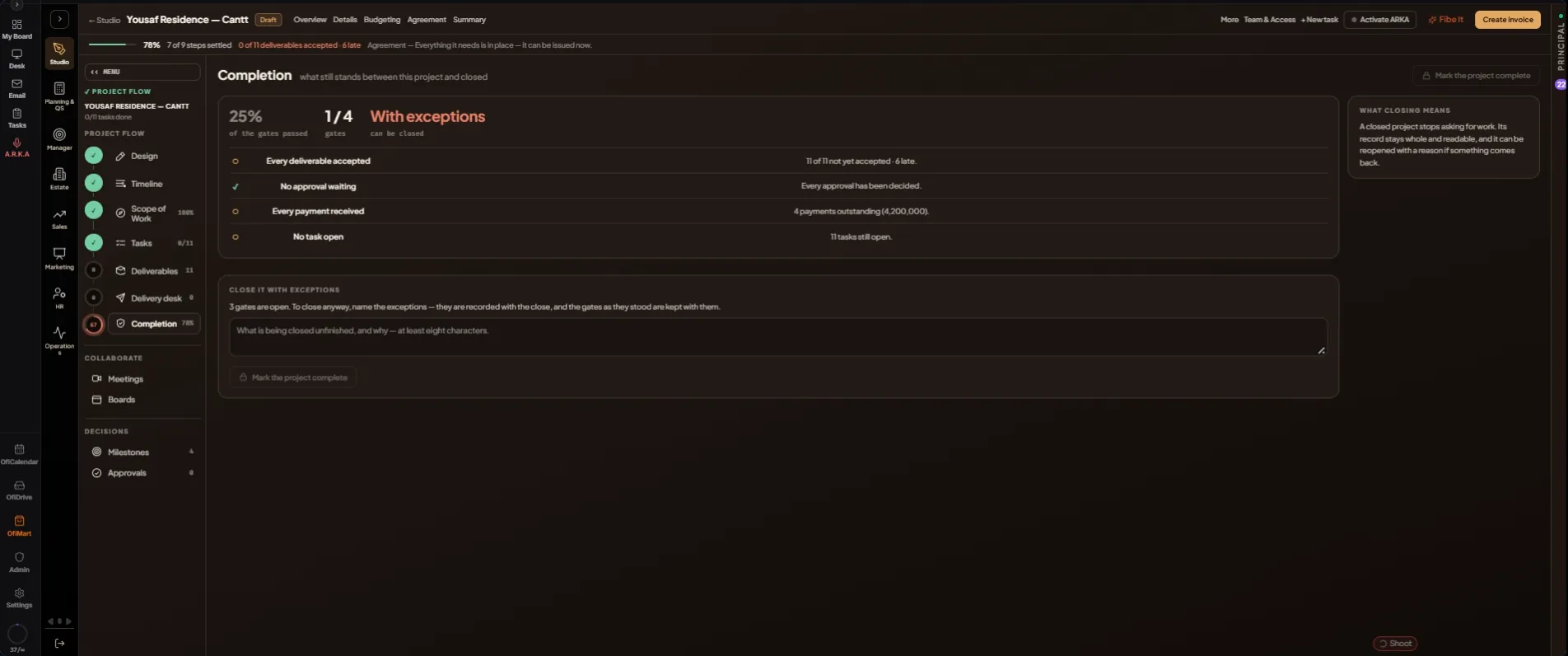
The room is titled "what still stands between this project and closed". Three figures lead it: the share of gates passed, the gates passed out of the total, and whether it can be closed ("Yes" or "With exceptions").
| Gate | Passes when |
|---|---|
| Every deliverable accepted | The client has accepted everything promised. |
| No approval waiting | Every approval has been decided. |
| Every payment received | No payment on the schedule is outstanding. |
| No task open | Every task is done. |
| Site handed over | Shown only when the project also runs on site: the taking-over certificate is issued. |
- Open Completion — Press "Completion" at the foot of the PROJECT FLOW. Its ring in the rail is the average of the flow's steps.
- Clear the open gates — Each gate says the number behind it, for example how many deliverables are not yet accepted. Press a gate to open the room that fixes it.
- Close a clean project — When every gate passes, the panel reads CLOSE IT. Press "Mark the project complete", then "Yes, complete it".
- Or close it with exceptions — With gates still open, the panel reads CLOSE IT WITH EXCEPTIONS. Write what is being closed unfinished, and why, in at least eight characters. Press "Mark the project complete", then "Yes, complete it". The exceptions are recorded with the close, together with the gates as they stood.
- Reopen if something comes back — A closed project shows REOPEN IT. Write why it is being reopened and press "Reopen". If the client has not accepted the current agreement, it reopens as a draft.
A closed project stops asking for work. Its badge reads Completed, its record stays whole and readable, and the live feed tells the team it is complete.
Handing over a site
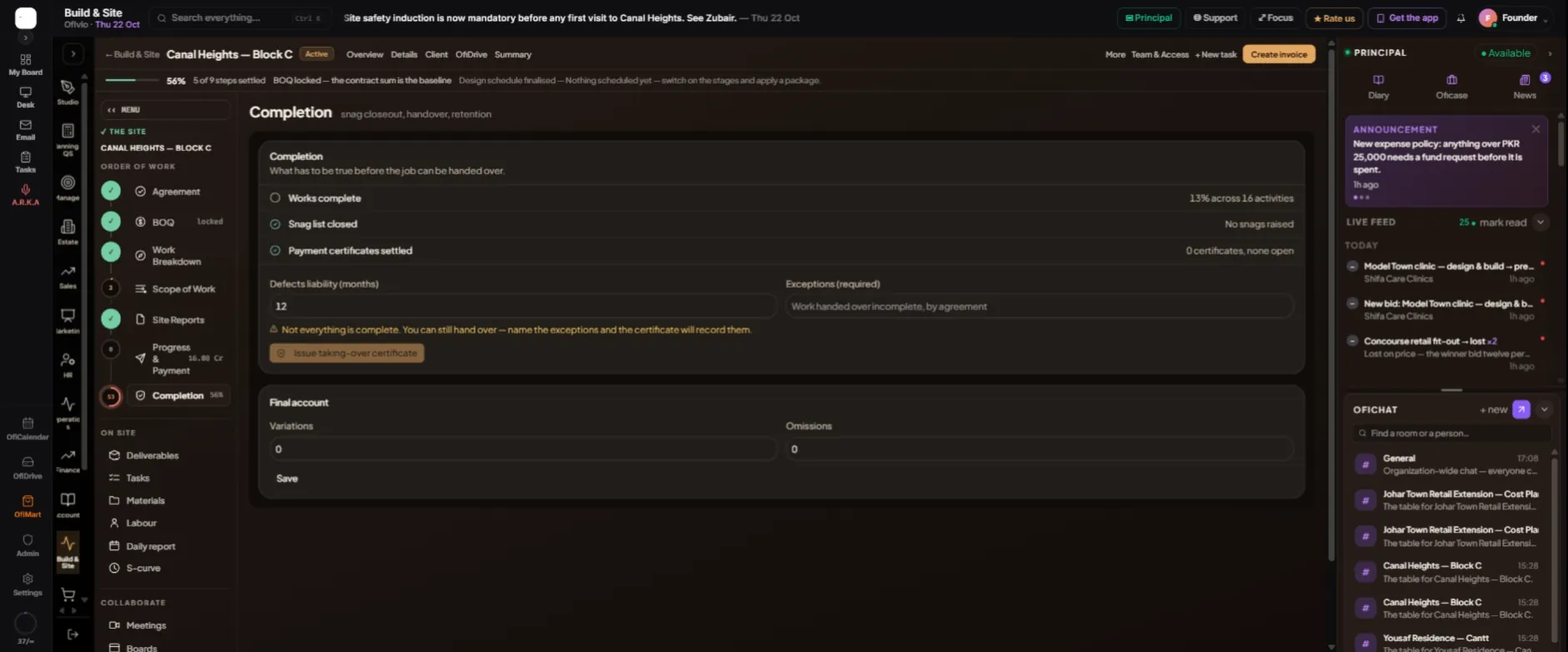
On a site the room is titled "snag closeout, handover, retention". The Completion box asks what has to be true before the job can be handed over, and checks three gates, each with its number: "Works complete" (the progress across the activities), "Snag list closed" and "Payment certificates settled".
- Set the defects liability period — "Defects liability (months)" starts at 12. Change it to what the contract says.
- Name any exceptions — If a gate is open, "Exceptions (required)" must be filled, for example work handed over incomplete by agreement. The certificate records them.
- Issue the certificate — Press "Issue taking-over certificate". The box then reads "Handed over" with the date, and when the defects liability ends.
- Keep the final account — Under "Final account", enter the "Variations" and "Omissions" and press "Save". The principal or a manager keeps it.
- Release the retention — If retention was withheld on the certificates, a Retention box appears. Press "Release" on "First half — on handover", and later on "Balance — end of defects liability", once the period has ended. Each release creates a payment milestone; it is marked paid from the money screens.