Ofivio — from onboarding to final delivery · Part 9 · On site · Chapter 42 of 56
Progress and payment: the IPC
Value the work measured to date, raise the interim payment certificate, record its certification, and raise the payment the client sees.
Progress and payment: the IPC
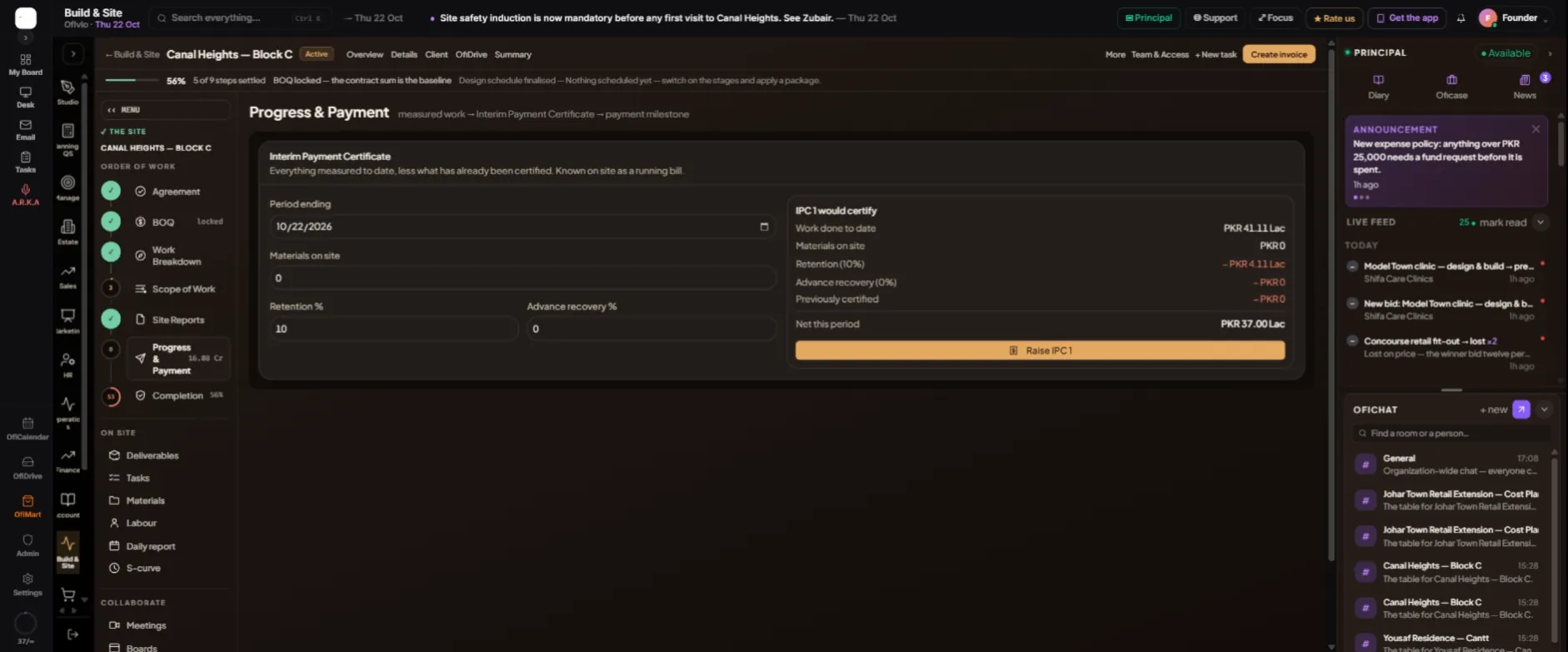
The interim payment certificate (IPC) is how a contractor is paid on account while the work goes on. Known on site as a running bill, it states everything measured to date, valued at the client's rates, less retention, less advance recovery, less what has already been certified. What is left is the amount due for the period.
You raise one each valuation period, usually monthly, once the daily reports carry the quantities measured. A principal, manager or finance seat raises and certifies certificates; a principal or finance seat raises the payment.
Measured in the daily report → Raise IPC → Draft → Certified → Payment milestone → Invoice → Paid
| Line on the certificate | How it is worked out |
|---|---|
| Work done to date | Every quantity measured to date on each BOQ line × that line’s client rate from the General BOQ. |
| Materials on site | The value of materials delivered and not yet built in, at the period end. You type it. |
| Retention (%) | That percentage of the work done to date, held back until handover and the end of defects liability. |
| Advance recovery (%) | That percentage of the work done to date, repaying a mobilisation advance. |
| Previously certified | The net to date of the last certified IPC. |
| Net this period | What this certificate claims. |
- Open Progress & Payment — Page rail › "Progress & Payment". If it says "Nothing measured yet", record quantities in the daily report first — a certificate is built only from measured BOQ lines.
- Set the period — "Period ending" is the valuation date.
- Enter materials on site — "Materials on site" — the value at the period end. Retention is not taken on it.
- Check the terms — "Retention %" (10 to start) and "Advance recovery %". From the second certificate on, they open on the terms the last one used.
- Read the figure — "IPC … would certify" updates as you type. A warning appears if any line has no client rate and would be certified at your own cost estimate.
- Raise it — Press "Raise IPC …". It appears under "Certificates" as Draft. Only one can be open at a time — certify or reject it before raising the next.
- Send it — Open the certificate and press "Download PDF". It prints on your letterhead with its status on its face — "DRAFT — NOT YET CERTIFIED" until certified. Send it to the client’s consultant.
- Record the certification — When the consultant certifies it, press "Certify"; the row shows "Certified by … on …". If they refuse it, press "Reject" and type their reason — it is kept on the certificate — then raise a corrected one.
- Raise the payment — Press "Raise payment milestone". A pending payment named after the certificate, for the net this period and due today, joins the site’s Milestones. The status becomes "Payment raised".
- Invoice and get paid — Press "Create invoice" in the site’s header to draw the invoice on that payment from Billing. When the money arrives it is marked paid from the money screens.
What the client sees. The certificate itself is the PDF you send. Once you raise the payment, it appears in the client's portal under Payments as a card with "Pay": the client pays by bank transfer with the receipt, or in cash, and your team confirms it. The invoice you draw appears under "Your invoices". The client only ever sees client rates — the Engineer Estimate never leaves your side of the BOQ.
Retention is held on every certificate, as a running total. It comes back at the end, in the site's Completion room: once the taking-over certificate is issued, "First half — on handover" can be released, and "Balance — end of defects liability" when that period ends. Each release, like each certificate, becomes a payment milestone.